
Pro-level features, just $3
Batch Image Converter
That Doesn't Cost $50
RAW support, EXIF editing, Watch Folder, PDF conversion, ICC profiles, watermarks, CLI — everything the $50 tools have, Just unzip and run.
RAW support, EXIF editing, Watch Folder, PDF conversion, ICC profiles, watermarks, CLI — everything the $50 tools have, Just unzip and run.
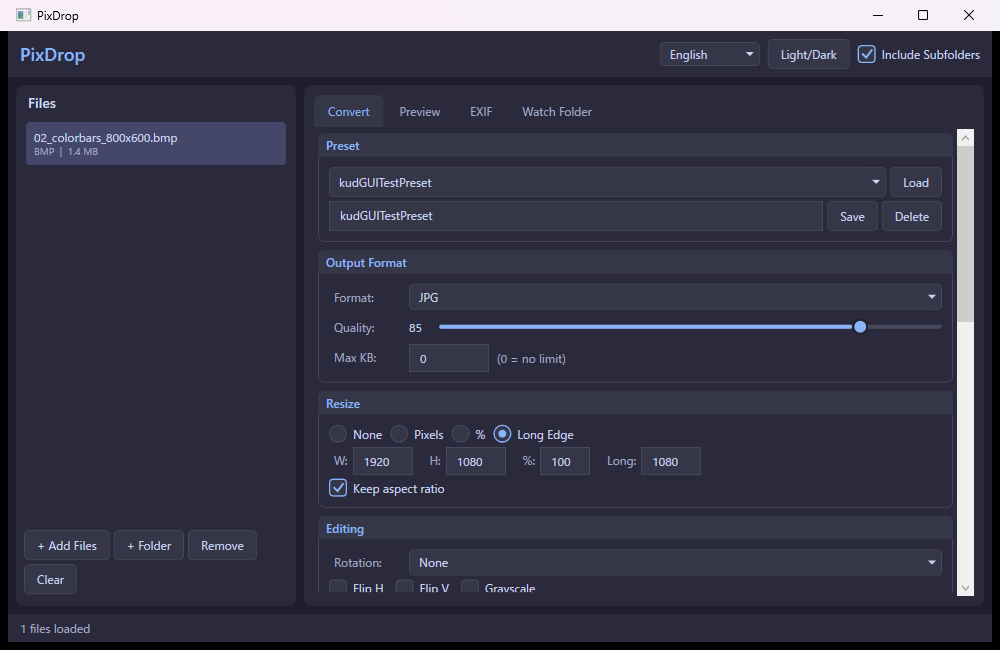
Features that usually cost $20–$50, packed into one lightweight tool.
Open and convert RAW files from Canon (CR2/CR3), Nikon (NEF), Sony (ARW), Panasonic (RW2), Olympus (ORF), Fuji (RAF), and DNG.
Pro FeatureView all metadata. Strip GPS info for privacy, or remove all EXIF data in one click. Protect your location before sharing online.
Pro FeatureMonitor a folder and automatically convert any new images with your chosen preset. Set it and forget it.
Pro FeatureMerge multiple images into a single PDF, or split a PDF into individual images. Configurable DPI for quality control.
Pro FeatureConvert between sRGB, Adobe RGB, and CMYK (US Web Coated SWOP). Get print-ready output without Photoshop.
Pro FeatureResize by pixels, percentage, or long edge. Rotate, flip, grayscale, brightness/contrast. Set max file size with auto quality adjustment.
Add text or image watermarks with full control over font, color, opacity, and position. 9 placement options.
Save your conversion settings and reuse them instantly. "Web", "Print", "SNS" — one click to switch. Stored as editable JSON.
English, Japanese, Simplified & Traditional Chinese, Korean, Spanish, French, German, Portuguese. Switch at runtime.
From legacy BMP to next-gen JXL — PixDrop handles them all.
■ RAW camera formats ■ Modern/next-gen formats
The features you'd pay $50+ for, at 94% less.
| Feature | Free Tools | Pro Tools ($20–$50) | PixDrop ($3) |
|---|---|---|---|
| Batch Conversion | ✓ | ✓ | ✓ |
| HEIC / AVIF / JXL | ✗ | ✓ | ✓ |
| RAW (CR2, NEF, ARW…) | ✗ | ✓ | ✓ |
| EXIF Edit / GPS Strip | ✗ | ✓ | ✓ |
| Watch Folder | ✗ | ✓ | ✓ |
| PDF Conversion | ✗ | ✓ | ✓ |
| ICC Profiles (CMYK) | ✗ | ✓ | ✓ |
| Watermark | ✗ | ✓ | ✓ |
| CLI / Automation | ✗ | ✓ | ✓ |
| Presets | ✗ | ✓ | ✓ |
| No Ads / No Watermark | ✗ | ✓ | ✓ |
| Portable (No Install) | ✗ | ✗ | ✓ |
| Price | $0 | $20–$50 | $3 |
Automate your workflow from the terminal. Every feature available via CLI.
Just unzip and run. No install. No subscription. Just $3.
Windows 10/11 (64-bit) • Portable (just unzip) • No .NET runtime required • ~60 MB download